
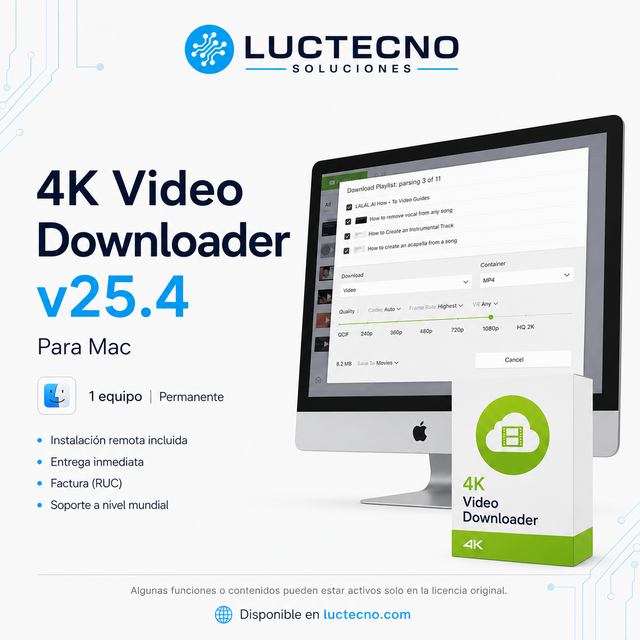
4K Video Downloader v25.4 for Mac
Modalidad según la opción elegida
$14.99 Precios con IVA incluido
Ver opciones Entrega digital


Luctecno Shop
$17.00Precios con IVA incluido
Final Cut Pro 12.0 for Mac is a professional video editing and post-production software, designed for creating, editing, organizing, color correcting, audio working, and exporting audiovisual projects with professional quality from macOS.
Asesoría personalizada antes y después de tu compra
Verifica con nuestro equipo la disponibilidad, la opción elegida y las condiciones de tu compra antes de pagar.
Recibe asesoría personalizada para elegir tu producto y ayuda para gestionar una incidencia.
Coordinamos la instalación remota después de confirmar el pago y la compatibilidad del equipo.
Consulta por WhatsApp la compatibilidad y la opción más adecuada para tus necesidades.
Final Cut Pro 12.0 for Mac is a professional video editing and post-production software, designed for creating, editing, organizing, color correcting, audio working, and exporting audiovisual projects with professional quality from macOS.
It is ideal for video editors, content creators, production companies, filmmakers, YouTubers, agencies, educators, and audiovisual professionals who need to assemble videos, work with high-resolution clips, create content for social media, perform multi-camera editing, apply titles, transitions, effects, subtitles, and deliver final projects with a professional finish.
Key features
• Professional software for video editing and post-production on Mac.
• Includes Magnetic Timeline for faster, more organized, and flexible editing.
• Allows working with titles, transitions, effects, audio, subtitles, and color correction.
• Compatible with workflows for YouTube, social media, courses, commercials, cinema, documentaries, and corporate content.
• Supports professional formats such as ProRes, ProRes RAW, H.264, HEVC, RED, XAVC, AVCHD, and Avid DNxHR/DNxHD, depending on device compatibility.
• Includes smart tools like Smart Conform, Magnetic Mask, and transcription to subtitles, depending on version availability.
• Recommended for projects in HD, 4K, HDR, multi-camera, and high-performance professional editing.
Ideal for
• Video editors and content creators.
• Filmmakers, production companies, agencies, and audiovisual professionals.
• YouTubers, educators, businesses, and marketing teams.
• Users who work with videos for social media, courses, commercials, events, and professional projects.
• People who want to edit on Mac with a powerful, fast, and Apple Silicon optimized tool.
Recommended Mac requirements
• Operating system: macOS 15.6 or higher.
• Processor: Apple Silicon recommended / Intel compatible depending on the device.
• RAM: 8 GB minimum / 16 GB or more recommended.
• Graphics: Metal-compatible card on Intel-based Macs.
• Storage: 7.2 GB available for installation, plus additional space for projects, cache, media, and exports.
• Recommended: SSD, good RAM, and Apple Silicon for fluid 4K, HDR, multi-camera editing, and heavy projects.
• For professional work, it is recommended to have fast external storage for libraries, raw footage, and backups.
Differences between alternate license and original license
This information is included so that the customer clearly understands what type of license they are acquiring and what features they can expect based on the chosen option.
Alternate license: is a non-original license, with a one-time payment and no monthly or annual subscriptions. It allows functional use of the program to edit videos, save projects, work with audio, apply effects, correct color, and export audiovisual content from the device where it is installed. It does not include official updates, artificial intelligence features, cloud services, or linking to personal accounts of the manufacturer. Linking accounts, manually updating, or modifying the program may affect activation and require additional technical assistance with cost.
Original license: is the official option from the manufacturer. It includes access to full features according to the contracted plan, an official account, online services, updates, AI features when available, and official support. Its cost is usually higher and it normally works under one-time payment, monthly, or annual plans, depending on the product and the modality defined by the manufacturer.
For business, corporate, governmental, or institutional use, Luctecno recommends original licenses, as they are the appropriate option to comply with best practices, audits, formal support, and more demanding professional needs.
Note: These licenses are linked to the device where they are installed and are not transferable.
Recibes el programa y la modalidad de licencia indicados en la opción y descripción del producto. La instalación remota se coordina con nuestro equipo.
La entrega es digital. Coordinamos la instalación remota después de confirmar el pago y la compatibilidad de su equipo.
Elige la variante compatible con tu sistema operativo. Las opciones, versiones y modalidades disponibles son las mostradas para este programa. Si tienes dudas, consulta antes de comprar.
La duración es la indicada para la variante seleccionada y en la descripción. Las opciones alternas permanentes no se limitan a un período de postventa; otras modalidades conservan la vigencia que indique su ficha.
Sí. Emitimos factura con los datos de tu compra. El precio incluye IVA; el envío, cuando corresponda, se coordina por separado.
La postventa gratuita cubre fallas atribuibles al programa. Revisamos la incidencia mediante asistencia remota. Las fallas provocadas por cambios o acciones del cliente requieren asistencia técnica adicional con costo, informado antes de realizar el servicio.
Si la revisión identifica que la falla fue provocada por cambios o acciones del cliente, esa incidencia no está cubierta por la garantía ni por el soporte gratuito. La reparación o reinstalación se ofrece como asistencia técnica adicional con costo, informado antes de realizar el servicio.
$14.99 Precios con IVA incluido
Ver opciones
$14.99 Precios con IVA incluido
Ver opciones
$14.99 Precios con IVA incluido
Ver opciones
$14.99 Precios con IVA incluido
Ver opciones